Revit Automation Suite
Small tools for the jobs nobody wants to do by hand.
- C#
- Revit API
- WPF
- Excel interop
In Revit, many routine jobs mean clicking through the same steps again and again, such as cleaning up a model before sending it out or copying standard settings into each project. Each of these four tools does one such job automatically, across a whole model or many projects at once.
The problem
Small, repetitive Revit tasks, such as setting up worksets, joining elements, copying types between projects and cleaning models before issue, add up to hours of engineering time every week.
What it does
A set of Revit add-ins for architecture and engineering teams: model management, worksets, element joins and bulk file operations. Each one replaced a manual routine that was costing engineers hours every week.
The quantity and finishes tools from the same years have since grown into products of their own, Qubecta and RIFADEX, and they're shown there. All demos below use a generic sample model.
Features
- Revit-Transmitter: prepares models for issue by detaching them with worksets kept or removed, purging unused elements and saving clean copies
- Worksets Manager: creates standard worksets from Excel or by classification, and puts every element in the right one
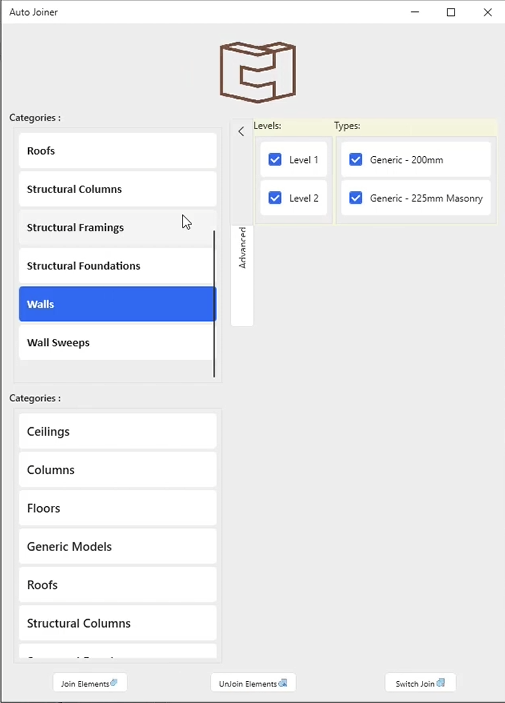
- Auto Joiner: joins or unjoins every overlapping element of the chosen categories in one go, so walls, floors and beams meet cleanly
- Transfer Types: copies types and families between many projects chosen from a folder tree
Terms on this page
- Revit
- Autodesk's main software for designing buildings as BIM models. Most architects and engineers use it.
- Add-in
- A small program that runs inside another program, here inside Revit or Navisworks, and adds new buttons and features to it.
- Family
- A reusable Revit component, such as a door, a window, a chair or a light fitting.
- Workset
- A part of a shared Revit model that one team member can edit while others work on the rest.
See it
Screenshots & demos